Wednesday, 23 November 2016

SOA Fundamentals

   
Service Oriented Architecture is an architecture principle and  as the name suggests is completely based on services orientation. The architecture divides the solutions in terms of small services and components  that accomplish the tasks required along with all the other layers that supports the services.

It comprises of different layers through which the whole architecture is built upon.

1. Consumers or Consumer layer:
   
The consume of the services reside in this layer who are the end users of the application or the   developed API or solution


2. Integration layer:                      
   
This provides the necessary Integration frameworks required for the communication between             different layers and also to the end users or consumers

3. Business Process Layer:          
     
This provides the necessary orchestration, workflow,composites ,                                                           mediation.

4. Service Layer:                          

This layer invokes the service components and the real implementation of the proposed solution. Typically service layer can be thought of a web service url exposed to the consumer .

5. Service Components:                

The implementation of the services exposed and can have many implementation types and built in form of components.

6. Operational layer:                      

This layer serves and provides the necessary infrastructure required for all the service components to deploy and run.
            
7. Quality of Service:          
        
This ensures monitoring, enforcing security policies,business processes.

8. Information layer:  
                  
This layer consists of information architecture, meta data considerations that helps in managing , maintaining, analyzing of data across information sources.

9. Governance Layer:  
              
This layer ensures the developed system adheres to all the  SLA's, policies and moreover ensure mechanisms are in place for smooth running, monitor and implement governance.


 Reference The open group soa/source-book/soa_refarch/layers.html
                                               

Monday, 31 October 2016

Exposing REST WEB SERVICE in TIBCO BW Using JSON

Hi All

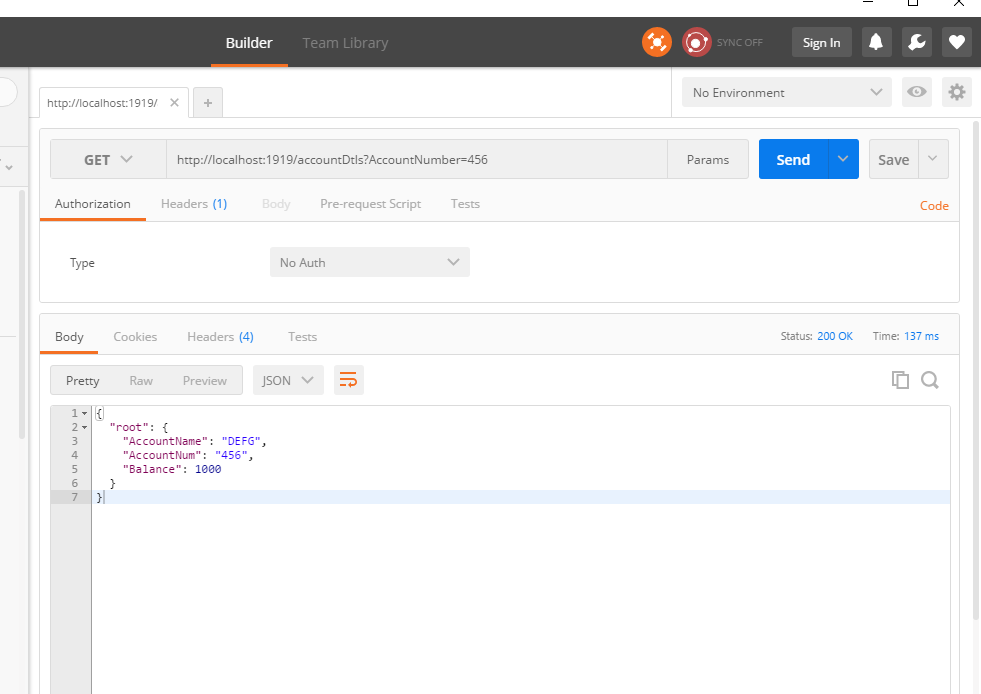
Today I am going to give a small example of how to use Tibco BW for exposing a REST web service using JSON and invoking it from POSTMAN client.

The example is very simple and   does not involve much logic, it is meant to understand how to configure a rest web service using REST Dispatch and Reply.


1.  Create a small Process Definition in Tibco Designer as getAccountDetails as below where I am          using Render JSON activity to create a JSON response for the call.


2. Create a process Definition  which will listen to the web service call . Configure your HTTP      receiver with a shared HTTP connection. Include a Rest Dispatch and Reply activity.


3.Configure you Rest Dispatch and Reply activity with the background method and input and output bindings as below. Add Resource as accountDetails , then add method as method1 as in the image      and map the process created in the step 1. Then add Request and Response parameter and again click on method1 and click Bind to map the input parameter to the background process and getting then    response back.                                                                                                                                       


4.  Configure the bindings as below and map the input and output parameters.


 5.  Save your project and run the tester .
      You can test the service by invoking it from the same BW , but today I am trying to invoke it               from the POSTMAN client. Download Postman client from google if you don't have.After that           you can create a GET request and receive the response JSON response as  shown in the image.