Hi All
Today I am going to give a small example of how to use Tibco BW for exposing a REST web service using JSON and invoking it from POSTMAN client.
The example is very simple and does not involve much logic, it is meant to understand how to configure a rest web service using REST Dispatch and Reply.
1. Create a small Process Definition in Tibco Designer as getAccountDetails as below where I am using Render JSON activity to create a JSON response for the call.

2. Create a process Definition which will listen to the web service call . Configure your HTTP receiver with a shared HTTP connection. Include a Rest Dispatch and Reply activity.


4. Configure the bindings as below and map the input and output parameters.

5. Save your project and run the tester .
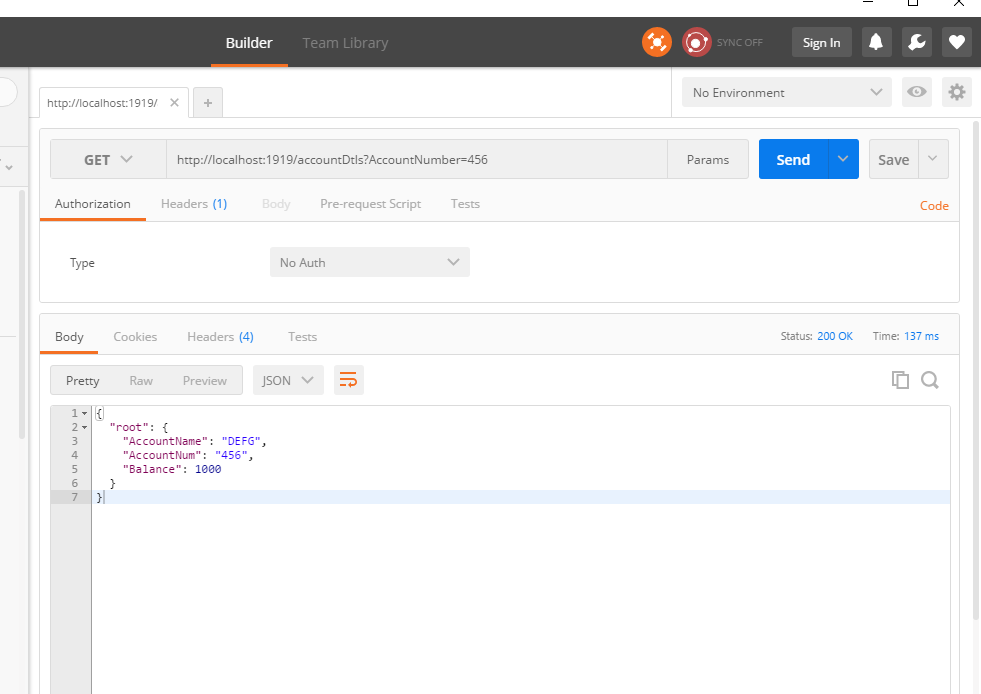
You can test the service by invoking it from the same BW , but today I am trying to invoke it from the POSTMAN client. Download Postman client from google if you don't have.After that you can create a GET request and receive the response JSON response as shown in the image.

Today I am going to give a small example of how to use Tibco BW for exposing a REST web service using JSON and invoking it from POSTMAN client.
The example is very simple and does not involve much logic, it is meant to understand how to configure a rest web service using REST Dispatch and Reply.
1. Create a small Process Definition in Tibco Designer as getAccountDetails as below where I am using Render JSON activity to create a JSON response for the call.

2. Create a process Definition which will listen to the web service call . Configure your HTTP receiver with a shared HTTP connection. Include a Rest Dispatch and Reply activity.

3.Configure you Rest Dispatch and Reply activity with the background method and input and output bindings as below. Add Resource as accountDetails , then add method as method1 as in the image and map the process created in the step 1. Then add Request and Response parameter and again click on method1 and click Bind to map the input parameter to the background process and getting then response back.

4. Configure the bindings as below and map the input and output parameters.

5. Save your project and run the tester .
You can test the service by invoking it from the same BW , but today I am trying to invoke it from the POSTMAN client. Download Postman client from google if you don't have.After that you can create a GET request and receive the response JSON response as shown in the image.